
How to Choose a Motorcycle GPS & Phone Mount That Reduces Vibration
Why Vibration Is the Enemy of Your GPS & Phone
Motorcycle engines and rough roads send vibration through your frame, bars, and forks in frequencies that standard device mounts were never designed to handle. At sustained exposure, that vibration stresses internal gyroscopes and camera components and can cause screen artefacts or connection dropouts. Choosing the right mount — and positioning it correctly — is one of the most practical steps you can take to protect your device and keep your screen readable at a glance.
Mount Location: Where You Mount Matters Most
The location you choose is the single biggest variable in how much vibration reaches your device. Different points on the motorcycle transmit very different vibration profiles.
Handlebar Mounts
Handlebars are the most accessible mounting point and work well for the majority of street, touring, and adventure riders. The outer ends of the bars tend to vibrate more than the centre clamp area, so positioning a handlebar mount close to the stem — or using a centre-bar mount — generally gives a more stable platform than clamping near the grips.
Steering Stem Mounts
Steering stem mounts attach below the top yoke and sit at the mechanical centre of the front end. Because they're closer to the fork axis, they tend to pick up less lateral vibration than outer bar positions, making them a popular choice for riders who want a low, central screen position that tracks the steering naturally.
Fork Stem & Triple Clamp Mounts
Fork stem and triple clamp positions (such as those offered by the BikePenR Fork Stem and BikePenR Triple Clamp ranges) place your device directly over the forks. This is mechanically stiffer than a handlebar arm but keeps the device out of the rider's primary sightline — a common preference for adventure and dual-sport riders who want the screen visible without obscuring the road ahead.
Support Bar Mounts
An auxiliary support bar clamped across the top yoke or cockpit area can give you the mounting position you want while keeping everything tidy. Because the bar itself adds a degree of mechanical compliance, it can subtly reduce transmitted vibration compared to a direct rigid clamp on the same surface.
Extension Length: Shorter Is Usually Stiffer
Any arm or extension between the clamp and your device acts as a lever. The longer that arm, the more amplified the vibration becomes at the device end — particularly for lateral (side-to-side) movement. As a general rule:
- Short arms (under ~75 mm) keep the device close to the mount point and minimise resonance.
- Medium arms (75–150 mm) offer more positioning flexibility and are still manageable with good ball-joint tightness.
- Long extension arms are best used only where the mounting location genuinely requires the offset — for example, clearing a windscreen or fairing — and should always be paired with a damping solution.
If you're using a RAM-style double-socket arm, check that both ball joints are fully tightened and that there is no slop in the connection; even a fraction of play becomes visible movement on screen at highway speed.
Vibration Damping: Absorbing What the Mount Can't Eliminate
No rigid mount can completely eliminate vibration — it can only reduce it. Dedicated damping addresses what positioning alone cannot.
Built-in Dampers
Some mounts include a rubber or elastomer damping layer between the clamp and the arm. This isolates a portion of the vibration at the source before it reaches the device. The BikePenR range is designed with this kind of vibration-dampening in mind, making it a practical option for riders whose bikes produce higher-frequency vibration — common on inline-four sport bikes and some single-cylinder adventure machines.
RAM Vibration-Damping Bases
Within the RAM Mounts ecosystem, specific bases and arms are rated for high-vibration environments. If you're building a RAM system for a bike that vibrates significantly at idle or high rpm, look specifically for RAM components listed as vibration-damping or vibration-isolating rather than standard rigid arms.
SP Connect Phone Cases and Anti-Vibration Module
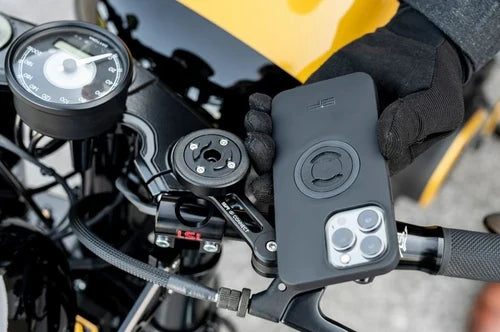
The SP Connect system combines everyday protection for your phone as well as up to 90% reduction in vibration the anti-vibration module is mounted on the bike. It is low profile solution with different mount options to suit all types of motorcycles.
Rigid vs Flexible Placement
The rigid vs flexible debate is really about trade-offs between stability and isolation:
- Rigid mounts keep the screen in a fixed, predictable position and are easier to glance at while riding. They transmit vibration directly but are generally the better choice when the mount location itself is already a low-vibration point (e.g., steering stem, short handlebar arm near centre).
- Flexible or ball-joint mounts allow you to dial in the viewing angle precisely and the compliance in the joint can absorb some vibration, but a loosely set ball joint becomes a source of vibration rather than a remedy for it. Always tighten ball joints to the manufacturer's recommended torque and re-check after the first few rides.
Device Fit: Snug Cradles Reduce Micro-Movement
A cradle or cage that fits your device precisely — with no rattle side-to-side or top-to-bottom — eliminates a significant source of vibration-induced wear. If your phone or GPS unit has any free play in its cradle, the device effectively hammers itself against the mount over thousands of vibration cycles. For custom fitment to specific device models, the Custom Mounts range is worth exploring, particularly if you're running a less common GPS unit or a phone in a thick protective case.
Use-Case Checklist by Riding Style
Adventure / Dual-Sport
- Prioritise vibration-damping mounts — unsealed roads generate sustained, unpredictable vibration
- Consider a fork stem or triple clamp position to keep the screen visible over rough terrain
- Use shorter arms where possible; longer arms amplify off-road vibration noticeably
- Check mount security before every ride — vibration loosens fasteners over time
- Ensure your cradle fits the device snugly with no rattle
Sport / Track
- High-revving inline engines produce fine, high-frequency vibration — damping layers are especially useful
- A BikePenR Handlebar or stem mount keeps the device low and out of the airflow
- Minimise arm length to reduce resonance at high rpm
- Rigid mounts at a stable bar position are generally preferred for consistent screen readability
Touring
- Long highway hours mean sustained vibration exposure — a quality damped mount pays off over distance
- Handlebar or steering stem positions work well for most touring ergonomics
- A medium-length arm gives comfortable viewing angle; pair it with a damping base if the bike vibrates at cruise rpm
- Ball joint tightness is critical on long trips — check it at fuel stops on the first touring run with any new mount
Commuter
- Stop-start urban riding is generally lower vibration than highway; a standard handlebar or stem mount is usually sufficient
- Prioritise quick device removal if the bike is parked in public spaces
- RAM Mounts with a quick-release head give you flexibility without sacrificing hold
- Snug device fit matters most here — repeated daily mounting and dismounting creates wear if the cradle is loose
Putting It Together
Good vibration management is about the whole system — mount location, arm length, damping, and device fit all interact. The biggest gains usually come from getting the mount location right first, then selecting an appropriate arm length, and finally adding a damping solution if the bike or riding style demands it. A well-fitted cradle is the last piece that ties it together.
Browse our BikePenR, RAM Mounts and SP Connect collections for options suited to your bike type, or explore Custom Mounts if you need a fit specific to your device model.